> ## Documentation Index
> Fetch the complete documentation index at: https://kb.micro1.ai/llms.txt
> Use this file to discover all available pages before exploring further.
# Invite Your Team
> Bring all your team together in micro1 to create interviews and review the results.
If you have a team you can invite them all to join your *micro1* account.
Every team member can create their own Jobs and Interviews and optionally you can define their access level.
To invite a team member to your account:
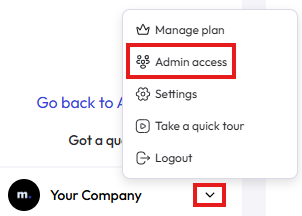
1. Click on the little arrow, in the bottom left of the page and then **Admin access**.
 2. Click on **Add a new member** button, in the top right of the page.
3. Enter the **Name** and **Email** of the person to be invited and click **Add**.
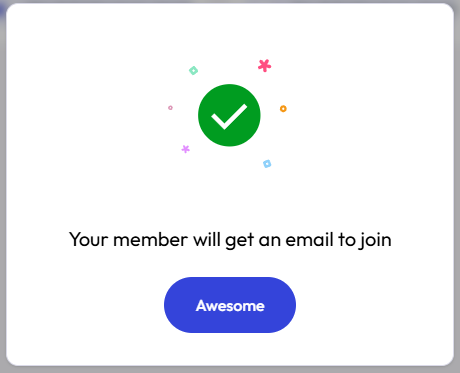
4. You should see the success message. Click **Awesome** to close the popup.
2. Click on **Add a new member** button, in the top right of the page.
3. Enter the **Name** and **Email** of the person to be invited and click **Add**.
4. You should see the success message. Click **Awesome** to close the popup.
 The invited team member will receive an email with the invitation and must click in the link of the email and complete the process to create an account to join your account.
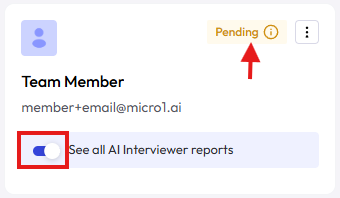
5. If want this new team member to only have access to interview reports for jobs owned by the member, disable the toggle that says **See all AI Interviewer reports**.
6. The card also shows if the invitation is **Pending** or if the person already **Joined** your team.
The invited team member will receive an email with the invitation and must click in the link of the email and complete the process to create an account to join your account.
5. If want this new team member to only have access to interview reports for jobs owned by the member, disable the toggle that says **See all AI Interviewer reports**.
6. The card also shows if the invitation is **Pending** or if the person already **Joined** your team.