> ## Documentation Index
> Fetch the complete documentation index at: https://kb.micro1.ai/llms.txt
> Use this file to discover all available pages before exploring further.
# Receive Applications
> How to receive applications for your jobs and/or import candidates from existing sources.
## Receive Applications
Whenever you create a job, you will have the ability to copy the application link to that job and share it with candidates.
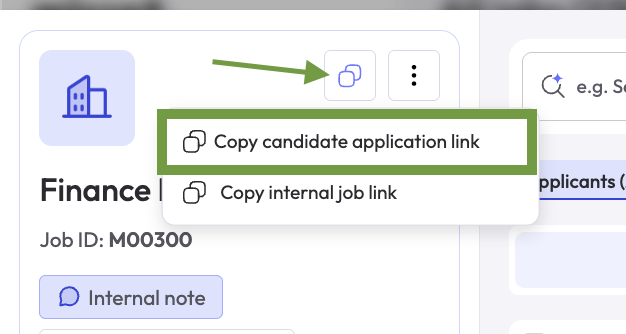
To copy the application link, open the job and click on the **copy** button on the top left corner of the screen, and then click where it says **Copy candidate application link**.
 ## Import Candidates
You can import/upload candidates in 3 ways:
1. Upload candidate resume in PDF or Word format
2. Bulk upload list of candidates in a CSV file
3. Import candidates from ATS connection
## Import Candidates
You can import/upload candidates in 3 ways:
1. Upload candidate resume in PDF or Word format
2. Bulk upload list of candidates in a CSV file
3. Import candidates from ATS connection
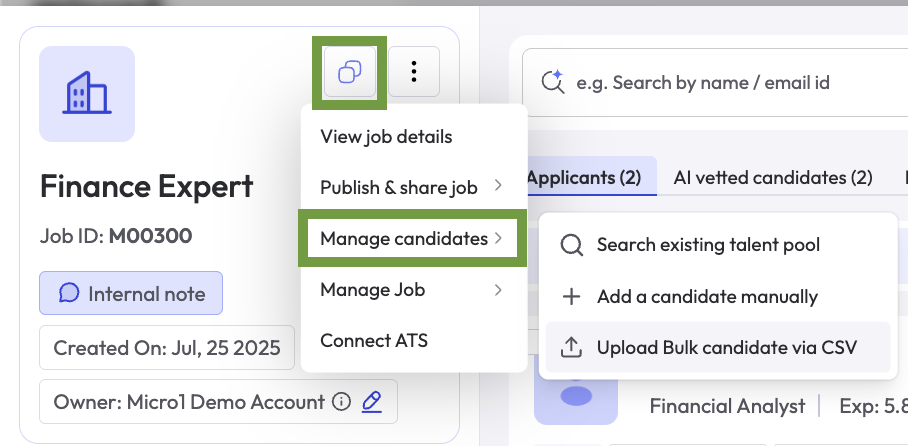 To add a candidate by uploading their resume, select the option **Add a candidate manually**