

What are dynamic tags?
Dynamic tags are placeholders like{{role_name}}that get replaced with real values when the email is sent.
Example:
You applied for {{role_name}} → You applied for Backend EngineerAvailable dynamic tags
You can use these tags in your invitation email content:{{application_link}}{{role_name}}{{interview_duration}}{{interview_type}}{{skill_list}}{{company_name}}
Why this helps (real benefits)
- Higher conversion: Candidates are more likely to start when they clearly see what it is and how long it takes.
- Fewer questions: Duration + interview type + skill list reduces “what am I walking into?” anxiety.
- Less manual work: No need to rewrite emails per role.
Step-by-step: Edit and personalize the invitation email
1) Open the invitation email editor
- Go to Settings
- Open Interview invitation email
- You’ll see an editor with your email content and formatting options.
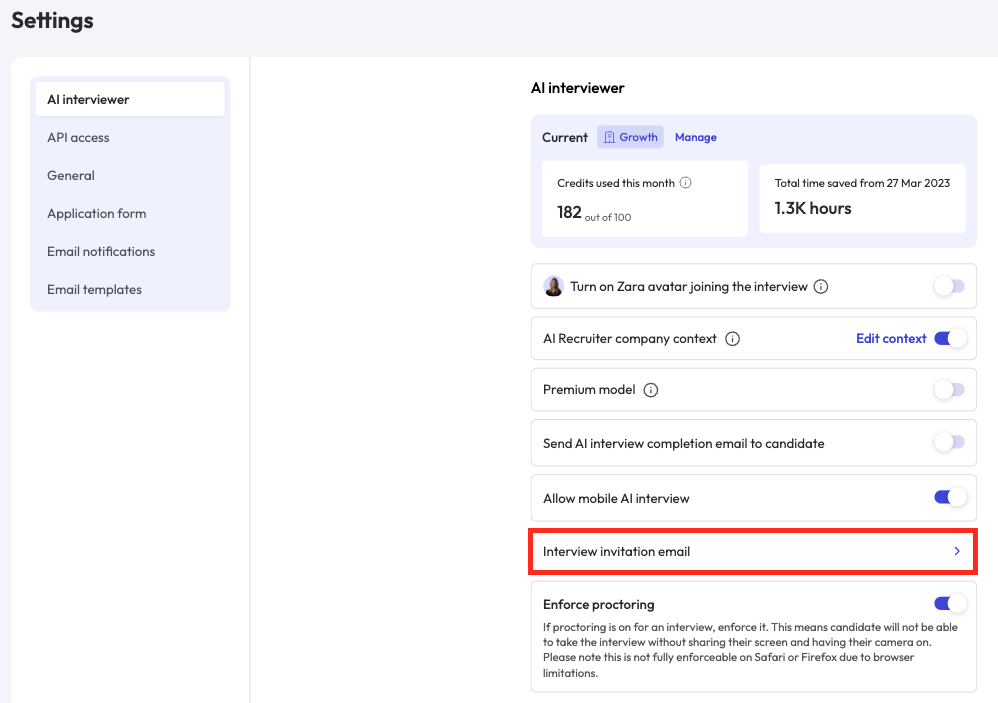
2) Add dynamic tags inside the email body
- Place your cursor where you want to insert a value
Example: after “applying for…” - Click + Add dynamic tag (top-right of the editor)
- Choose the tag you want (it will insert at your cursor)
- Role:
{{role_name}}near the start - Duration:
{{interview_duration}}near “What to expect” - Skills:
{{skill_list}}as a short bullet list or line item - Interview type:
{{interview_type}}near prep instructions - Company:
{{company_name}}in greeting + sign-off
3) Keep the CTA clean
Your email already includes the CTA button (example: “Take AI interview”).Avoid pasting
{{application_link}}randomly in the middle, unless you want a backup link.
Best practice:
- Keep CTA button as the main action
- Add a fallback line at the end like:
“If the button doesn’t work, use this link: application_link”
4) Review the email for readability
Before saving:- Keep it short: candidates scan, they don’t read novels (sad but true)
- Put key info above the fold:
- Role
- Duration
- Skills
- Make prep notes skimmable (bullets > paragraphs)
5) Save the template (don’t skip this)
Once you’re done editing:- Scroll to the end
- Click Save Changes
- You’re set. New invites will use the updated template.
Suggested invite email structure (copy-ready)
You can use this layout and customize the tone:Invite email copy
Thank you for your interest in company_name and applying for role_name.We’d like to invite you to complete an interview with Zara.
- Estimated time:
{{interview_duration}} - Interview type:
{{interview_type}} - Skills covered:
{{skill_list}}
- Use stable internet
- Sit in a quiet place
- Don’t close the browser during the interview
- Make sure to share screen and camera permissions if asked
You can also check out our AI Interview Guide if you’d like to feel more comfortable before starting.We’re excited to hear your responses.Best regards,
{{company_name}}Team