

Accessing Support During Your Interview
During AI interviews, any candidate can access micro1 live support by clicking the “Having Trouble?” button located in the bottom-right corner of the screen.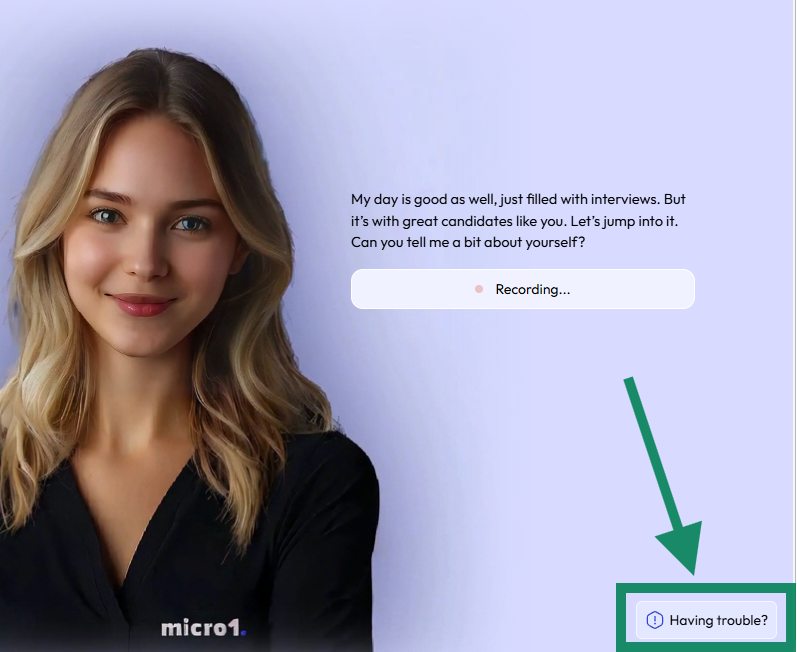
Before Starting the Interview
✅ Device & Browser Requirements
To ensure your interview runs smoothly, please follow these requirements:
🔗 System Check: Run a quick configuration test before your interview to confirm everything is working properly.
🎯 Best Practices for a Good Interview
- Choose a quiet, well-lit space for your interview.
- Close unnecessary apps or browser tabs to free up system resources.
- Read each question carefully and speak clearly.
- Keep your camera centered and maintain eye contact for better communication.
During the Interview
🆘 How to Use the “Having Trouble?” Button
If anything goes wrong during the interview:- Click the “Having Trouble?” button at the bottom-right corner.
- Select the issue you’re facing (e.g., camera, microphone, connectivity).
- Follow the on-screen guidance provided for that issue.
Need More Help?
If you’re still having trouble, please contact our support team via email: 📧 help@micro1.ai Please include the following details in your message:- Your full name
- Email address used for the application
- The role you applied for
- A short description or screenshot of the issue
Currently, support is provided via email only.